
Yes. Most smart locks on homes run on their own batteries, not on the house's electricity, so a power outage does not lock or unlock the door and your keypad code still works. Losing Wi-Fi only takes away the remote features: locking or unlocking from the app when you are away, alerts on your phone, and changing codes from a distance. The thing that can really leave you outside is the lock's own batteries dying, and that is the part worth getting ready for before winter.
People in Colorado Springs are asking this right now for a practical reason. Public outage-tracking data showed roughly 900 Colorado Springs Utilities customers without power at the peak on November 25, the day before Thanksgiving, and wind and snow bring more outages like that every winter. If you put a smart lock on the front door this year, it is fair to wonder what it does when the lights go out.
What Happens to a Smart Lock When the Power Goes Out
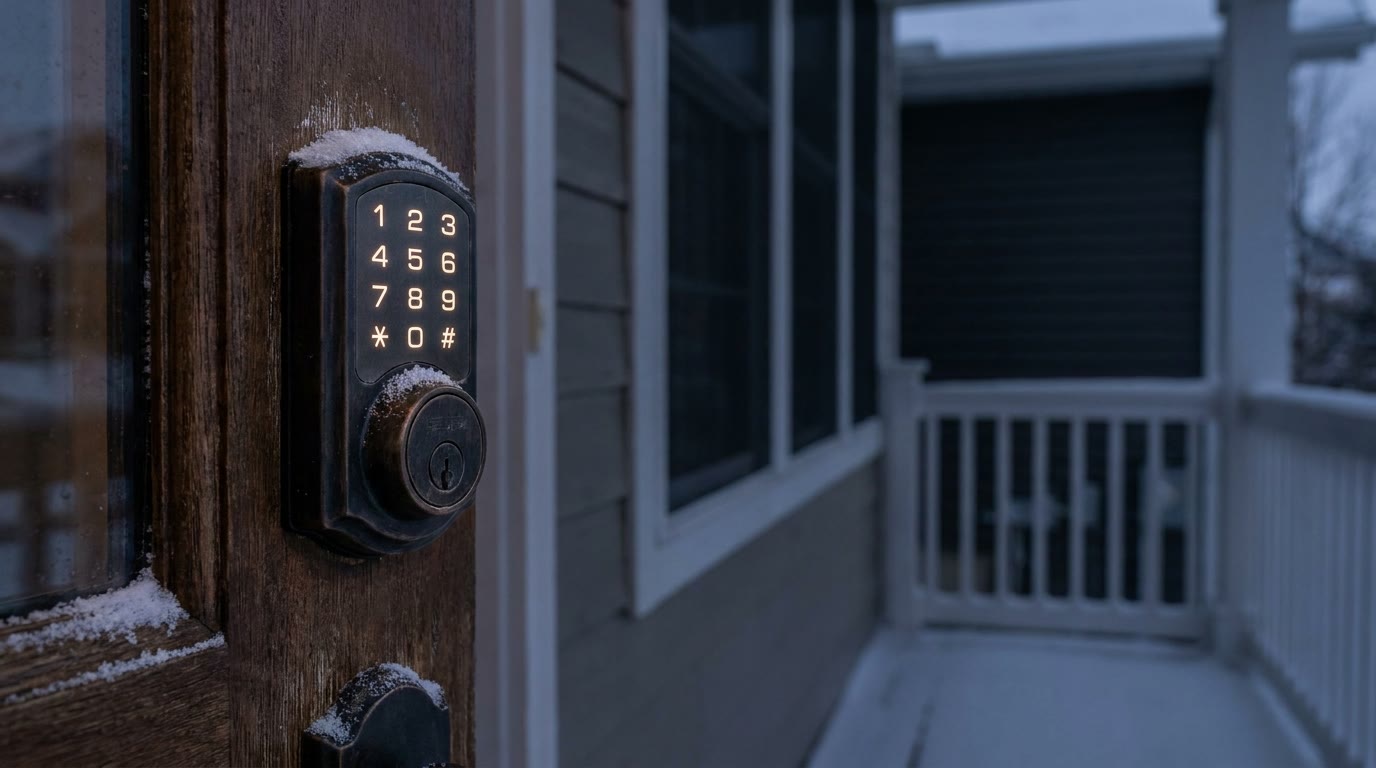
On a typical residential smart deadbolt, nothing changes at the door. The lock has its own battery pack, usually inside the cover on the indoor side, and the bolt stays exactly where it was: locked stays locked, unlocked stays unlocked. The codes are stored in the lock itself, so the keypad, and the fingerprint reader if your model has one, keep working as usual.
What you lose is everything that depends on equipment plugged into the wall:
- The Wi-Fi router. No router means no connection between the lock and the app when you are away from home.
- A hub or bridge. Some locks reach the internet through a small plug-in bridge. When it is dark, the lock is on its own.
- Voice assistants and automations. Routines such as "lock up at 10pm" may not run until power and internet return.
One exception is worth knowing. Hardwired systems on commercial doors, such as electric strikes and magnetic locks tied to an access control system, do depend on building power and on how their battery backup is set up. That is a different product from the battery deadbolt on a house.
What Still Works Without Wi-Fi
Wi-Fi is how a smart lock talks to you when you are somewhere else. It is not how the lock opens. With the internet down, these still work on most models:
- Keypad codes, including guest codes that are already saved in the lock.
- Fingerprint entry, on locks that have a reader.
- Bluetooth from your phone, on locks that support it, when you are standing at the door.
- The physical key, if your lock has a keyway.
What stops until the connection is back: unlocking for someone remotely, lock and unlock alerts, the live activity log, and on many models creating or deleting codes from the app. If you rent out a property or let a dog walker in with a code you send from your phone, set those codes up before a storm, not during one.
The Real Risk: The Lock's Own Batteries
A power outage will not lock you out. Dead batteries in the lock can. And cold is hard on batteries: the common alkaline cells lose output as the temperature drops, so a lock that seemed fine in October can turn sluggish on a single-digit night, especially on a door that faces north or takes the wind.
Watch for the warnings. Most smart locks tell you well ahead of time with a low-battery light, a different beep, or a notice in the app, and the motor often sounds slower before it quits. Do not wait those out in winter.
The door itself matters too. When a frame shifts in the cold and the bolt rubs on the strike plate, the motor has to push harder on every lock and unlock, and the batteries drain faster. If you have to pull or lean on the door to get it to lock, read our guide on why a deadbolt gets hard to lock in cold weather and fix the alignment first.
Pro Tip from Locksmith Solutions LLC
Do not let the garage be your only way in. When the power is out, the garage door opener is out too. If you always come in through the garage and never carry a house key, an outage becomes a lockout even though your smart lock is working fine. Keep a key, or a working keypad lock, on at least one entry door.
If the Batteries Die While You Are Outside
- Use the key. If your lock has a keyway, this is what it is for. Keep a key in your wallet or car, or with a neighbor you trust. Not under the mat.
- Check for an emergency power point. Many keyless models have two small contacts for a 9-volt battery, or a USB port for a power bank, on the outside. It gives the lock enough power for you to enter your code. Your manual shows where it is.
- Try another door. A back or side door with a regular key is a fine backup plan.
- Do not pry or drill. Forcing a smart lock usually ruins the lock and can damage the door, and it is rarely faster than a proper opening.
A Winter Checklist for Smart Lock Owners
- Change all the batteries at once before the deep cold, and again whenever the lock warns you.
- Use the battery type your manual calls for. Some makers advise against lithium or rechargeable cells because the lock cannot read their charge level correctly.
- Confirm that every adult in the house knows a code and where the backup key is.
- Find the emergency power contacts or port on your model now, while it is warm and light out.
- Test that the bolt throws freely with the door closed. If it rubs, have it adjusted.
When to Call a Locksmith
Call when the lock is dead even with fresh batteries, when the motor runs but the bolt does not move, or when you are outside with no key and no way to power the keypad. Our house lockout service gets the door open without wrecking the lock where that is possible, and we can tell you whether the lock or the door was the problem.
If you are choosing a lock, or the one you have was never fitted quite right, our smart lock installation in Colorado Springs covers picking a model that suits the door, including whether you want a key backup, and setting the bolt and strike so the motor is not fighting the frame all winter. For a broader look at the options, see our post on smart lock installation and what to expect.
Frequently Asked Questions
Will a smart lock unlock by itself when the power goes out?
No. A battery-powered smart deadbolt does not react to a house power outage at all. It stays in the position it was in until someone uses a code, a key or the thumb turn.
Can I use a smart lock with no Wi-Fi at all?
Yes. Many keypad locks work fully at the door with no internet connection. You give up remote control and phone alerts, and on some models you set codes at the keypad instead of in the app.
Do smart locks remember the codes after the batteries die?
On most models, yes. Codes are kept in memory that does not need power, so they are still there after you put in new batteries. Check your manual to be sure for your lock.
How long do smart lock batteries last?
It depends on the model and how often the door is used. Many last several months to about a year. Cold weather, a bolt that rubs, and a constant Wi-Fi connection all shorten that.
Smart lock dead or acting up?
Call Locksmith Solutions LLC and tell us the brand and what the lock is doing. We help with lockouts and smart lock problems during our hours: Monday to Friday, 7:00am to 9:30pm, and Saturday and Sunday, 8:00am to 9:00pm, across Colorado Springs, Fountain, Falcon, Monument, Security-Widefield and Manitou Springs.